
A course’s due date is not a single setting. The learning environment works it out from up to three things: the “Days to complete” set on the program the course belongs to, the “Expiration” (and optional “Recertification” window) set on the course, and the date the learner first logged in. This article shows where each of these is set.
Due dates only apply to mandatory courses, meaning courses that learners are assigned through a program. A learner who is enrolled in a course by any other method (for example, manually or via self-enrolment) will not have a due date, and the course will not appear in their Compliance Overview. To understand how the settings combine to produce a date, see Understanding Due Dates.
Step-by-step Guide
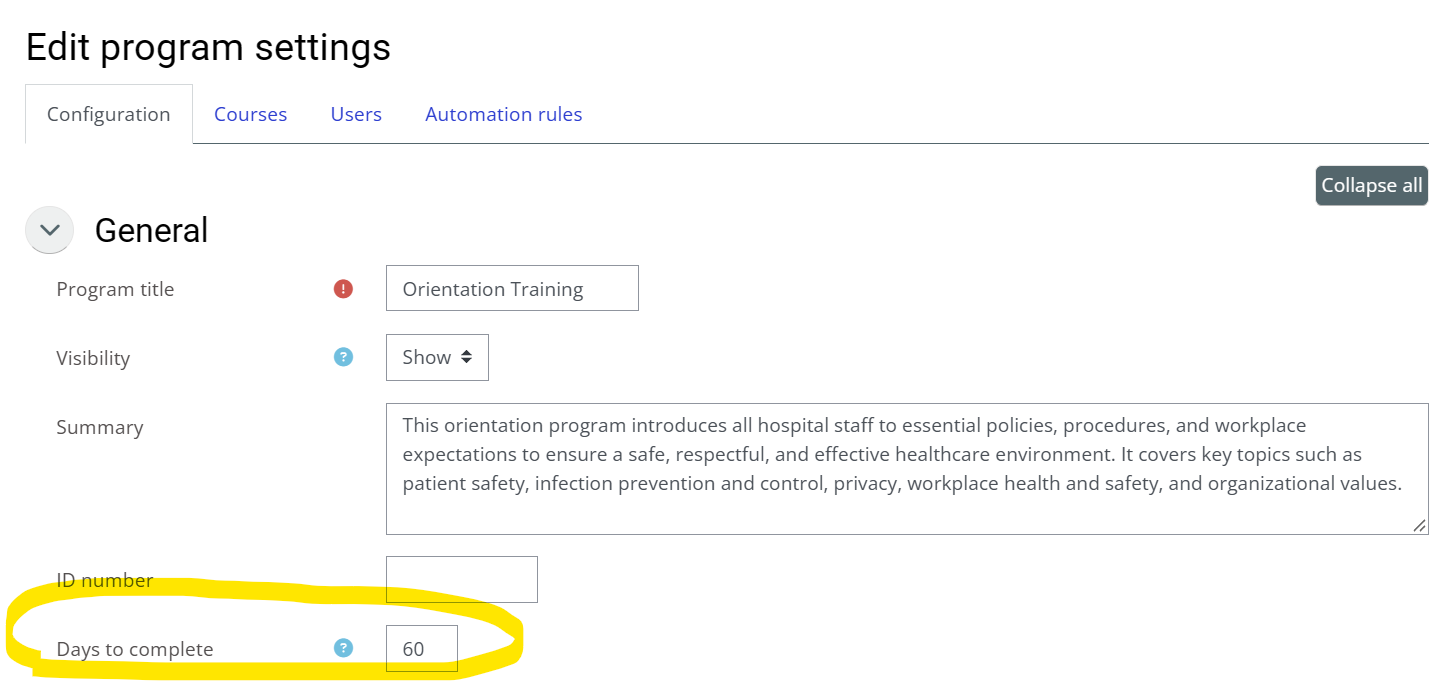
Setting the number of days to complete on a program
The “Days to complete” setting on a program only applies to learners who have never completed the course (or been credited with it through an equivalency or an imported learning record). Once a learner has a learning record for the course, their next due date is based on the course’s expiration settings instead. For newly created users, the clock starts the first time they log in to the learning environment. If a learner has not yet logged in, no due date is shown and the countdown does not begin.
To give learners a number of days to complete the courses in a program:
-
Go to Site Administration > Programs
-
Click on the program in question
-
Find the “Days to complete” field
-
Enter the number of days learners have to complete the courses in the program. Leave it at 0 if you do not want the program to set a deadline.
-
Click on the “Save changes” button.
Setting when a learning record expires in a course
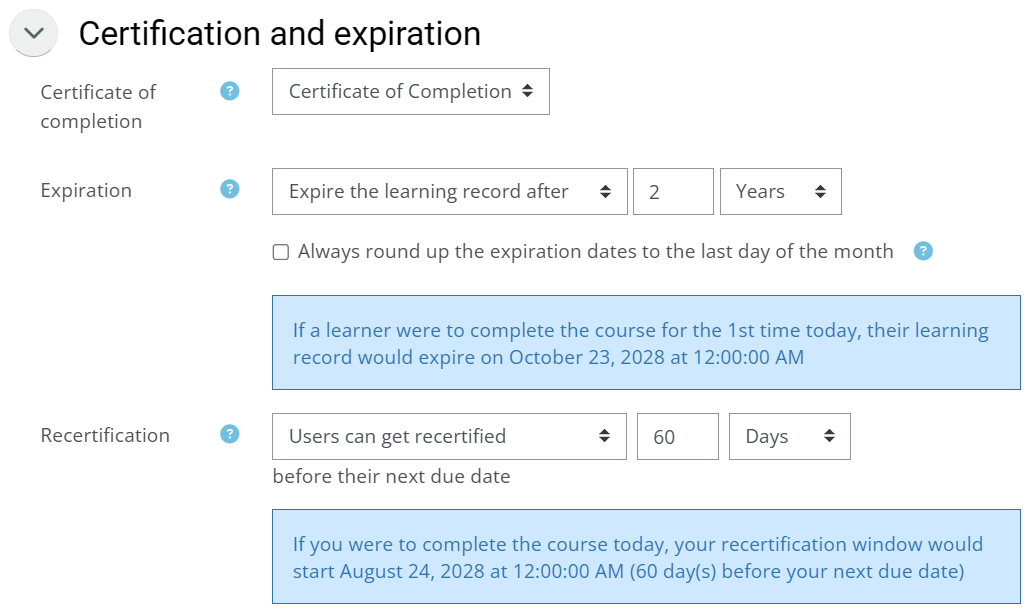
The course’s “Expiration” setting determines the due date in two situations: when the learner already has a learning record for the course (including one from an equivalency or an import), and when the program’s “Days to complete” is set to 0. In both cases the due date is calculated from the course’s expiration rules. If “Expiration” is set to “The learning record never expires” and “Days to complete” is 0, there is no due date.
To set the expiration in a course:
-
Go to the course in question
-
Go to Course Administration > Course Settings
-
Expand the “Certification and Expiration” section
-
Set the “Expiration” field. For what each option means, see Configuring Recurring Courses.
-
(Optional) Set the “Recertification” field to control how early learners may renew. See Restricting when Users can Get Recertified.
-
Click on the “Save changes” button.
Important Notes
-
A program-based due date requires that the learner is registered in the program (see Registering Users in Programs) and has logged in to the learning environment at least once. The Compliance Overview only lists courses that belong to a program.
-
If a learner is registered in several programs that include the same course, the earliest due date is the one displayed.
-
Changing the “Expiration” setting only affects learning records created afterwards; existing records keep the expiration they were given when they were created. This also applies to records you import, so set the expiration before importing attendance or learning records. To correct existing records, see Updating Learning Records After Changing the Expiration Dates.
-
If a course expires on a fixed date each year but you want new hires to have an earlier deadline, include the course in a program for new hires and set “Days to complete” on that program. When a learner has more than one due date for a course, the earliest one is shown.
-
Due dates are calculated separately for each learner, so “Due date” is not available as a column in custom reports. Use the Compliance Overview, or send supervisors the monthly compliance email (see Sending a Monthly Compliance Report to Supervisors).
-
If a learner’s due date is not what you expect, check the following, in order:
-
Is the learner registered in a program that includes the course?
-
Has the learner logged in at least once?
-
Is the learner in more than one program that includes the course?
-
What are the course’s “Expiration” settings, and was the learner’s last learning record created before those settings were changed?
-