
The learning environment assumes that the person who creates a classroom session will also be the Facilitator for that session. As such, the user who creates the session automatically becomes the “Facilitator” for that session. The exception is when a session is created as a copy of another session, in which case the original Facilitator is retained.
If you want to set / change the Facilitator for any session, you can.
Step-by-step Guide
To change the Facilitator for a session:
-
Go to the face-to-face activity in question
-
Click on the "Edit session" icon next to the session in question
-
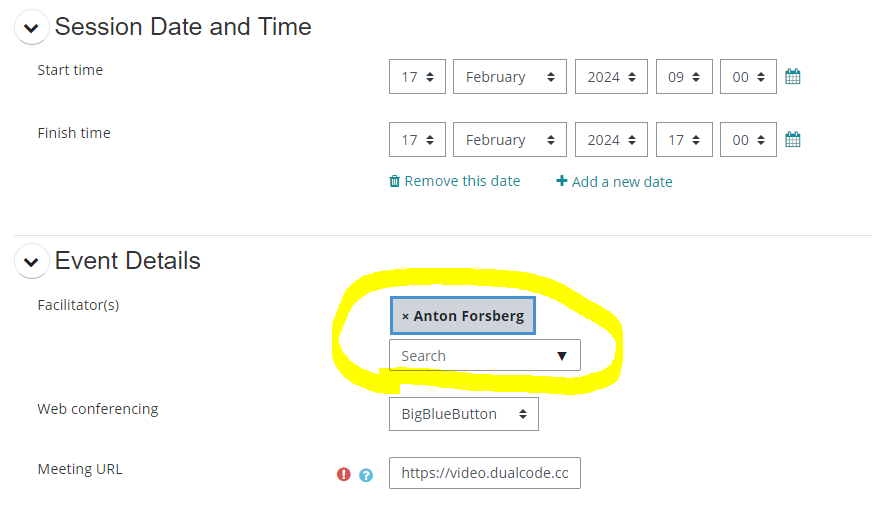
In the “Event details” section, select the Facilitator(s). You can select more than one.
Important Notes
-
A Facilitator is not a role with special permissions. It is simply a designation used to identify which administrator will be facilitating the session.
-
Only administrators who are enrolled in the course can be added as Facilitators to a session. If the administrator is not enrolled in the course, they must enrol themselves first by following the instructions in the Getting Administrator Access for Another Course.
-
A Facilitator is not limited to the session they are assigned to facilitate. Facilitators have visibility into other sessions and access to other activities and reports within the course. For example, a Facilitator can view the Completion Status report to verify whether a participant has completed the prerequisites for a session.
-
If you intend on adding administrators to the system but don`t want them to have access to all courses in your system, you can restrict their access by following the step-by-step guide in the Restricting an Administrator's Access article.
-
When a user is assigned as the Facilitator for a session, they will receive a calendar invitation for that session. If they are later removed as the Facilitator, the calendar invitation will also be updated accordingly.